Medo's Home Page : QText
Programs
QText
Windows Mobile
Programming
Contact
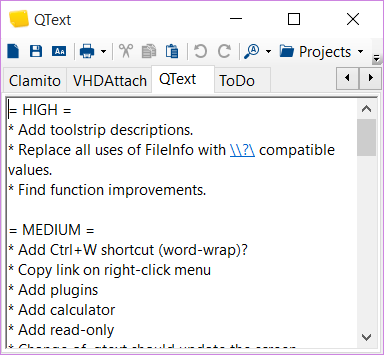
Screenshot

This program started with itch of mine. I often have need to take notes while talking on telephone, surfing or doing almost anything. That notes are usually just temporary since I want to do something with it - like adding telephone number to my phonebook. What I needed was scrap paper.

It is similar to notepad which can be brought from tray when needed but has also auto-save thing going on. Just ideal for taking notes.

2.20
• Added Find option.
• Fix: Window restoring via shortcut.
• Fix: Clipboard bug (Requested Clipboard operation did not succeed).
2.10
• Changed installer to InnoSetup.
• Small bug fixes and changes.
2.00
• Redesigned Options.
• Added Ctrl+1, Ctrl+2, ..., Ctrl+0 shortcuts.
• All code is in one .exe.
• Application name is no longer written on top of each printed page.
• Sorting works on Windows Vista.
• Support for RichText format.
• Tray option to restore on primary screen.
• Auto update in case of direct file system changes.
• Fixed loading of form on repeated start.
• Support for high DPI.
• Defaults for font are taken from system.
• Splash screen is now not displayed by default.
• Full support for 64-bit systems.
• Removed auto-start after install (Vista's UAC made some problems).
1.40
• Fixed right-click cut behaviour.
• Manifest for Windows Vista.
• Changed toolbar and menu appearance.
• Fixed multiple screens issues.
• Added support for Redo (only with Rich Text Box).
1.31
• Fixed taskbar click behaviour.
• Fixed problems with window positioning.
1.30
• Added Ctrl-Backspace and Ctrl-Del shortcuts.
• Fixed small multiline tab problems.
• Added option to reset options to default.
• Added selection sorting.
• Added selection case conversion (including "Dr. Grammar" title case).
• Added option of minimize/maximize buttons.
1.20
• Added Alt+Backspace shortcut.
• Added option to reopen last selected file upon startup.
• Changed TextBox to allow multiline tab identing.
• Bug fixing.
1.11
• Fixed issue when program needed to be restarted in order for Hotkey to be activated.
• Added option entries for foreground and background text color.
1.10
• Built on .NET Framework 2.0.
• Redesigned interface.
1.04
• Small update.
1.03
• Added option to select storage folder.
• Did not save when only single file existed.
1.02
• Added tray context menu.
• Added "Reopen".
• Increased startup speeds.
1.01
• Fixed tray icon appearance.
• Vertical scroll added.
1.00
• First public release.
Freeware
370 KB
needed only if you cannot run given .msi file
Download3k.com is a software archive with more than 50,000 software programs, shareware and freeware, daily updated and also tested with some of the best antivirus engines available today.
FreewareFiles.com
100% CLEAN award granted by Softpedia
Download2PC award